Rumskrot Issues is built for one moment: you have just noticed something, and it needs to be a GitHub issue before the thought is gone.
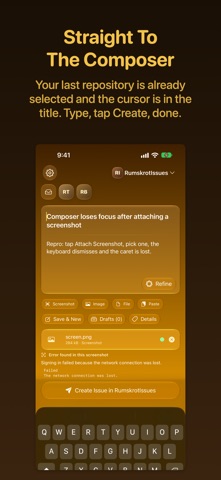
So the app opens on the composer. Not a repository list, not a dashboard — a title field with the cursor in it and the repository you used last already selected. Type, tap Create, done.
STRAIGHT TO THE COMPOSER
• The repository you used last is still selected when you come back.
• The draft is saved as you type. Backgrounding the app, force-quitting it or switching repository cannot take it away.
• Save & New parks a draft and starts the next one, so a burst of ideas becomes a burst of issues.
ATTACH THE REAL THING
• Screenshot, Image, File and Paste are separate, deliberate actions.
• Paste takes whatever a share sheet put on your clipboard — a log, a JSON export, a crash dump — and attaches the actual bytes, not a filename.
• Images and video upload while you are still typing, and every attachment shows its own state.
• Text files are posted as a collapsed comment; archives GitHub will not accept are kept on the device, never silently dropped.
IT READS THE SCREENSHOT
Attach a screenshot of an error and the text in it is recognised on the device, then offered — quoted word for word — for the body. Nothing is added until you tap Add to body.
TIDY IT UP, ON-DEVICE
Tap Refine and the on-device language model suggests a clearer title and a structured Markdown body. You review the suggestion; the draft only changes when you apply it. No cloud model, no API key, and creating an issue never depends on it.
THE REPOS YOU'RE ACTUALLY IN
The picker is your working set, not GitHub's whole database. Favourites come first, then the repositories you have used in the last few days. Several GitHub accounts can sit side by side.
WORK THROUGH THE QUEUE
Triage Mode gathers the open issues from the repositories you choose into one queue of cards — excerpt, labels and latest comment at a glance — so a backlog can be read in a sitting. Open any card to label, reply or close it. On iPad it becomes a split view you can drive from the keyboard.
EVERY ISSUE, FULLY RENDERED
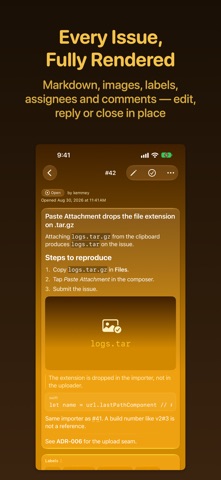
Open an issue and it reads the way GitHub shows it: Markdown, images, labels, assignees and comments. Edit the title and body, reply, close or reopen, and change labels and assignees in place.
FROM ANYWHERE
• Share to Rumskrot Issues from any app, and the shared item arrives as an attachment.
• A Control Center control and Shortcuts actions open straight into a new capture.
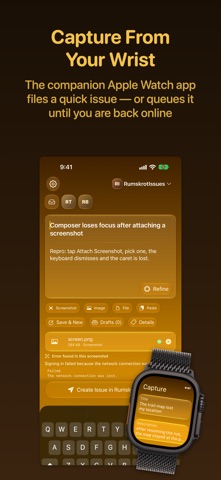
• Offline? The issue is queued with its attachments and sent when the connection returns.
• A companion Apple Watch app captures a quick issue from your wrist.
SIGN IN
GitHub's device flow — no password typed into a third-party app. A personal access token works too. Credentials stay in the Keychain.
MORE FROM RUMSKROT
• Rumskrot Beacon — network probes: ping, DNS, traceroute, TLS audits.
• Rumskrot Pulse — a debugger for Bluetooth LE.
• Rumskrot Nearfield — an NFC toolkit that exposes the whole tag.
• Rumskrot Terminal — a full SSH client.
• Rumskrot Remote — remote desktop for your Mac.
• Rumskrot Archives — open ZIP, RAR, 7-Zip and TAR without extracting them.
No ads. No tracking.
Terms of Use (EULA): https://www.apple.com/legal/internet-services/itunes/dev/stdeula/
Privacy Policy: https://danskrumskrot.com/privacy