Access Mastery is an offline guide to VoiceOver, the screen reader built into Apple devices. It takes you from turning VoiceOver on for the first time to working like a power user, on iPhone, iPad, Mac, Apple Watch, Apple TV, and Apple Vision Pro. It is written for blind and low-vision people, and for sighted people learning VoiceOver to teach or support someone.
WHAT'S INSIDE
54 chapters, about 48,000 words, all built into the app:
- About This Guide: 2 chapters on how to use the book and how VoiceOver fits together
- iPhone: 25 chapters, from first steps and core gestures through the rotor, typing, braille screen input, text editing, speech and verbosity, Safari, Mail, Maps, Camera, Live Recognition, Bluetooth keyboards, braille displays, and troubleshooting
- iPad: 5 chapters on what is the same, iPad gestures, external keyboards, multitasking, and troubleshooting
- Mac: 9 chapters on getting started, the VO keys, navigating, the rotor, VoiceOver Utility, trackpad gestures, essential keyboard commands, the web, and troubleshooting
- Apple Watch: 4 chapters
- Apple TV: 3 chapters
- Apple Vision Pro: 3 chapters
- Apps, Practice, and Sources: helpful accessible apps, a practice plan, and accuracy notes
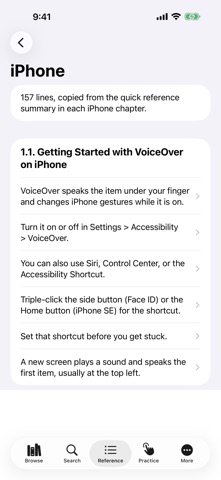
Every chapter follows the same layout: Overview, What you'll learn, numbered steps with one action each, a practice exercise, a quick reference summary, and sources. Gestures and key commands are written in words, such as "two-finger double tap," so they read cleanly with speech or braille.
FEATURES
- Two ways to start: "I use VoiceOver," or "I'm sighted and learning VoiceOver," which adds a short orientation on turning VoiceOver on and off safely
- Browse by device, with chapter pages that use real headings for the VoiceOver headings rotor
- Full-text search across every chapter, with the number of results spoken
- Quick Reference: each device's quick reference summaries in one place
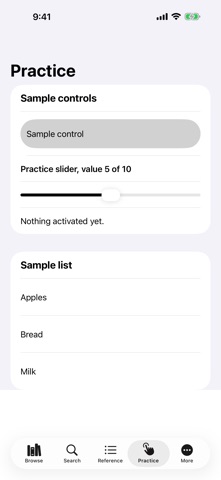
- Practice: a real button, slider, and list to try gestures on
- Bookmarks, reading progress, mark-as-complete, and Resume where you left off
- Text size up to the largest accessibility sizes, a stronger contrast option, and support for Reduce Motion, Dark Mode, and iPad multitasking
PRIVATE AND OFFLINE
No account, no sign-in, no ads, no tracking, and no in-app purchases. The app collects no data. Your progress and bookmarks stay on your device.
HONEST NOTES
This guide is not an Apple manual and is not affiliated with or endorsed by Apple. It was written in November 2026 with AI assistance from Apple's own user guides and support articles, and each chapter lists its sources. It targets iOS 26, iPadOS 26, and Apple's current guides for the other devices. Apple can change gestures and settings in later updates; a chapter on accuracy explains where the book is less certain, and your device and Apple's current guide always win. VoiceOver, iPhone, iPad, Mac, Apple Watch, Apple TV, and Apple Vision Pro are trademarks of Apple Inc.